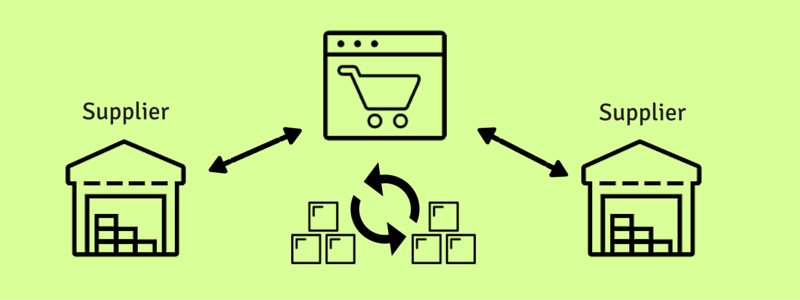
Managing one dropship supplier can be fairly straightforward. Managing several can quickly turn into a mess of spreadsheets, emails, inventory files, split orders, and missed tracking updates. The real challenge is not storing products. It is keeping supplier inventory, order routing, fulfillment status, and customer communication synchronized across every sales channel.
This guide explains how to manage multiple dropship suppliers. It also shows where manual workflows break down and when automation makes sense.
Most online retailers will tell you managing inventory & orders can be a challenge. Traditional retailers have the task of managing the physical inventory. Storing, organizing, packing, and shipping all have their unique and often tedious organizational issues.
Online retailers that choose to sell “dropship” products have a whole new set of challenges they need to deal with. Their biggest challenges involve managing inventory and order data, not the physical logistics traditional retailers handle.
For those that are not familiar. When dropshipping, you do not purchase the products wholesale and physically store the items as traditional retailers often do. Instead you purchase the products individually after an order has been placed on your website. Your supplier ships the product directly to the customer, so you never store or physically handle it.
You can see how “managing inventory” can mean a much different thing when adding dropship to your supply chain mix. Managing multiple dropship suppliers requires tighter inventory and order management to stay in sync.
Multi-Supplier Integration Points
Inventory and order management need the most attention when working with multiple dropship suppliers.
In the dropship world, “Inventory Management” typically means preventing out of stock sales . Few things frustrate customers more than ordering an item that cannot be fulfilled. Sync supplier inventory with your online store at least daily to avoid listing out-of-stock products.
In addition to syncing the inventory quantities, dropship retailers that sell from multiple dropship suppliers face a separate set of “multi-vendor management” challenges to ensure the orders are able to be fulfilled efficiently and, most importantly, without error.
The right foundational process for dropship inventory management goes hand in hand with efficient dropship order management. You can’t really have one without the other. Key principles like SKU uniqueness, product overlap management, and data integration, allow online retailers to efficiently route their dropship orders and automatically update their customers with shipment tracking information.
The Short Answer
To manage multiple dropship suppliers effectively, you need to:
- Keep SKUs unique across suppliers
- Sync supplier inventory regularly
- Route each order to the correct vendor
- Manage products carried by more than one supplier
- Track split shipments
- Collect tracking information from every vendor
- Monitor exceptions before customers are affected
These tasks can be handled manually at low volume. As your supplier count, sales channels, or order volume grows, automation becomes much more reliable.
Ensuring SKU Uniqueness
The SKU, which stands for stock keeping unit, still means a lot when you do not hold anything in stock. The SKU is how a single product is uniquely identified for important information such as quantity and price.
Beyond syncing inventory quantities, merchants with multiple dropship suppliers must also manage orders carefully to avoid fulfillment errors.
The only way to manage this and ensure SKU uniqueness is to have a system. A system we employ at Inventory Source is to prefix SKUs with supplier name initials. This way you can quickly identify whether an SKU is listed from a certain supplier. And, as long as each supplier’s initials are kept unique, it eliminates the possibility of duplicate SKU numbers.
A Quick Example:
Bob’s Distributing has a product identified in their inventory data as SKU123
Dan’s Pet Supplies has a product identified in their inventory data as SKU123
In your online store you will want to avoid duplicates. Track two unique SKUs to ensure accurate inventory data and order routing.
So you would prepend the initials for each to be managed as…
Bob’s Product = BDSKU123
Dan’s Product = DPSKU123
No duplicates… simple unique SKUs.
Keeping unique SKUs across suppliers allows retailers to accurately manage inventory quantities, costs, pricing, and other data.
The method of using “supplier initials + the original SKU” makes it simple to identify the supplier associated with the product. It also allows you to easily route the product orders to the correct supplier.
There are other methods to ensure SKU uniqueness. We’ve found that prefixing the SKU with supplier initials to the original SKU allows retailers to quickly identify the supplier and easily determine the original SKU number managed by the supplier — which the supplier will likely require when ordering the product.
For those that setup automated order routing, unique SKUs also ensure that you’re able to set up this routing. Confident that orders are being routed with the right products to the correct suppliers.
In the event multiple suppliers carry the same product, aka “Supplier Product Overlap”, this can add another layer of complexity to the inventory management and order routing process.
Supplier Product Overlap
In some cases you may have relationships with multiple suppliers that carry the same product. For an online retailer that’s listing inventory and routing orders to a dropship supplier, this requires more attention and management than the traditional retailer who is simply buying the products wholesale and storing them.

(Image Source: Flickr)
One of the key advantages to dropship is the ability to list more products for sale on your website than you can justify buying wholesale. So it only makes sense to maximize the amount of time your dropship products are listed as “in-stock”. In the scenario of multi-supplier inventory listings, you likely only want one product listing on your ecommerce store to keep a smooth shopping experience for your customer. However, this product listing is being generated and fulfilled by two different vendors who likely have two different stock quantities.
In order to keep your product listing “in-stock” and on your site longer to maximize the chance for a sale, you will want to list the quantity as the sum of the two suppliers’ product quantity data.
The downfall to a “summed inventory” approach is in the event of a “split order” that requires you to ship the product from multiple suppliers to be able to fulfill on the quantity ordered. This means you now have to incur duplicate shipping costs and have the product arrive in two separate boxes, likely at two separate times.
One way to prevent “split orders” is to average the inventory count across the multiple suppliers, eliminating the possibility of a quantity larger than what one supplier can fulfill being listed on the website. This reduces the “in-stock” time this product listing may have on your website, but it can prevent you from fulfilling an unprofitable order or providing a poor customer experience.
Both a “summed” and “averaged” inventory approach will typically require Dropship Automation Software, but this could also be accomplished through spreadsheet functions and manual importing as well.
Cross-Supplier Split Orders
You may be thinking… “okay, well it looks like I can prevent split orders in the event of a single product, but what about in the case of an order with multiple products from multiple suppliers?”
Well, unfortunately there is not much you can do here to prevent this. Most retailers will not want have an online store that prevents items from being ordered together, so this is just a reality of a multi-vendor dropship fulfillment strategy.
One way to try and decrease the probability of this happening is to choose suppliers that carry very different product lines that are less likely to be combined in the same order. Another fairly common method to hedge against the possibility of split orders would be to try and work with larger distributors that carry multiple product lines to reduce the number of suppliers necessary to carry the products you are wanting to list on your website.
When Manual Dropship Management Stops Working
Spreadsheets and email may work when you have one or two suppliers and a manageable number of orders. Problems usually begin when you add more products, vendors, or sales channels.
Common warning signs include:
- Orders are manually copied into supplier emails
- Team members regularly chase vendors for tracking numbers
- Inventory updates arrive in different file formats
- The same product is available from several suppliers
- Orders need to be split between warehouses or vendors
- Customers receive late or incomplete shipment updates
- Staff spend too much time correcting routing mistakes
- You cannot easily see which supplier is responsible for an order
At that point, the issue is no longer just organization. The business needs a system that can centralize orders and automate supplier handoffs.
The Multi-Supplier Dropship Strategy
There are strong incentives and benefits to building relationships with several different suppliers to work with on a dropship basis. Pricing leverage, product availability, and a larger assortment of products to sell are all reasons why a multi-supplier strategy can make sense for your retail business.
However, when dropshipping across these multiple fulfillment partners, you will need to be aware that, even though you do not have to physically manage the products, there is a data management layer that can take just as much coordination and effort to run your business effectively. A little planning and upfront investment can lead to an effective multi-supplier fulfillment strategy, as well as a strong competitive advantage.
| Task | Manual process | With dropshipping software |
|---|---|---|
| Order routing | Email or spreadsheet | Automatically routed by supplier or SKU |
| Inventory updates | Manual imports | Supplier feeds and synchronized updates |
| Tracking collection | Chase each supplier | Supplier enters tracking through a portal |
| Split orders | Managed individually | Split by SKU or fulfillment location |
| Visibility | Spread across inboxes and files | Centralized in one system |
| Scaling | Requires more staff time | Automation handles increasing volume |
How Ordoro Helps Manage Multiple Dropship Suppliers
Ordoro helps eCommerce businesses centralize and automate dropshipping workflows across multiple suppliers and sales channels.
With Ordoro, merchants can:
- Automatically route dropship orders to the correct supplier
- Split orders based on SKUs and fulfillment locations
- Give suppliers access to their own Vendor Portal
- Share order details without relying on long email chains
- Sync inventory levels with fulfillment partners
- Collect tracking numbers and send them back to connected sales channels
- Manage dropshipping, in-house fulfillment, and 3PL orders in one system
- Use supplier feeds, automation rules, kits, bundles, and shipping-method mapping
Ordoro is designed for businesses that have outgrown manual supplier coordination and need better visibility into fulfillment. Its dropshipping app currently supports automated routing, split orders, Vendor Portals, supplier inventory syncing, and tracking writeback. Managing multiple suppliers should not require a daily spreadsheet rescue mission.
Explore Ordoro’s dropshipping tools.
Frequently Asked Questions
How do you manage multiple dropship suppliers?
Use unique SKUs, synchronize supplier inventory, route orders based on the correct vendor, track split shipments, and maintain a reliable process for collecting tracking information.
Can one order be sent to multiple dropship suppliers?
Yes. When an order contains products from different suppliers, it may need to be split and fulfilled in separate shipments.
How do you prevent duplicate SKUs across suppliers?
Create a consistent SKU structure, such as adding a supplier abbreviation to the original supplier SKU.
What is a dropship Vendor Portal?
A Vendor Portal gives suppliers a dedicated place to receive orders, update fulfillment status, and submit tracking information without relying entirely on email.
When should an eCommerce business use dropshipping software?
Dropshipping software becomes useful when manual routing, supplier communication, inventory syncing, or tracking updates take too much time or lead to frequent errors.
Can Ordoro manage both dropshipping and in-house fulfillment?
Yes. Ordoro supports dropshipping, in-house fulfillment, 3PL workflows, or a combination of these models in one platform.
Ready to Stop Managing Suppliers by Spreadsheet?
Ordoro helps eCommerce businesses automate order routing, coordinate with multiple vendors, collect tracking information, and manage hybrid fulfillment from one place.
Explore Ordoro’s dropshipping tools.
The dropshipping app currently starts at $299 per month and includes a 15-day free trial with no credit card required, so linking to pricing is appropriate for readers who are already evaluating solutions.
About the Author:
Travis Mariea is the Managing Director at InventorySource.com, the dropship automation software that connects your 3PL or dropship supplier’s inventory and orders with your eCommerce Website and Marketplace Accounts.
- 2026 Holiday Shipping Surcharges: UPS, FedEx, USPS & DHL
- Kitting in eCommerce: How Kits and Bundles Affect Inventory
- Commerce Corner: Big News, Fresh Features & Free Swag
- Haven’t Checked Your Walmart Seller Account Lately? You Might Want To.
- eBay Sellers Got a Glimpse of Higher Ad Costs. Then Came the Explanation.