Update: We originally published this article in 2012 as a short video introduction to dropshipping. This updated guide explains how to start dropshipping, including how to choose suppliers, organize products, route orders, manage inventory information, and keep customers updated after each sale.
Dropshipping can make it possible to sell products without storing, packing, or shipping them yourself. When a customer places an order, the merchant sends the order information to a supplier, and that supplier ships the product directly to the customer.
The concept is straightforward, but the operation can become complicated quickly. A merchant still needs to choose dependable suppliers, maintain accurate product information, protect margins, route each order correctly, receive tracking updates, and resolve problems when an order involves several suppliers or fulfillment methods.
A successful dropshipping business is not simply an online store connected to a product catalog. It is a coordinated process connecting the customer, merchant, sales channel, and supplier.
What Is Dropshipping?
Dropshipping is a retail fulfillment method in which a merchant sells a product without storing or shipping it. After the customer places an order, the merchant purchases or requests fulfillment from a supplier, manufacturer, or distributor that sends the product directly to the customer.
The merchant remains responsible for the customer relationship. The shopper purchases from the merchant’s store, receives communication from that business, and generally contacts the merchant when there is a delay, damaged item, return, or other problem.
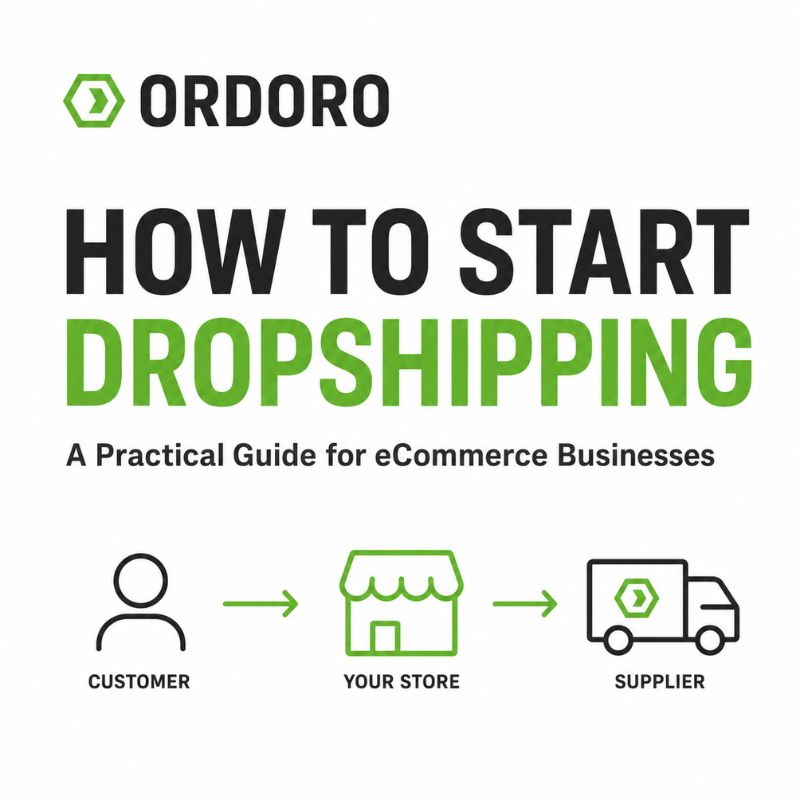
A basic dropshipping workflow includes three main parties:
- The customer, who places the order
- The merchant, who markets and sells the product
- The supplier, who stores and ships the product
The merchant may never physically handle the item, but that does not remove responsibility for making sure the order is accurate, delivered as promised, and supported after the sale.
How Does the Dropshipping Process Work?
The process begins when the merchant chooses products from one or more suppliers and adds them to an online store or marketplace. The merchant creates the product listings, establishes the selling price, and attracts customers through advertising, search, content, marketplaces, or other channels.
When a customer places an order, the merchant sends the necessary order information to the supplier. Depending on the setup, that handoff may happen through email, a supplier portal, a file, an application programming interface, or an automated order-routing system.
The supplier then picks, packs, and ships the product directly to the customer. Once the shipment is created, the supplier provides tracking information. That tracking should return to the merchant’s order system and sales channel so the customer can follow the delivery.
The basic sequence is simple:
- The merchant lists the supplier’s product.
- The customer places an order.
- The order is routed to the appropriate supplier.
- The supplier ships directly to the customer.
- Tracking returns to the merchant and customer.
The difficulty increases as the business adds more suppliers, sales channels, products, warehouses, and order volume.
Decide What You Want to Sell
Choosing products should involve more than finding a supplier willing to ship them. The merchant needs to understand who will buy the product, what problem it solves, how much competition exists, and whether enough margin remains after every expense is included.
Dropshipping merchants often sell products that other businesses can access from the same suppliers. That makes product selection, positioning, customer service, content, and brand trust particularly important. Competing only on price can be difficult when several sellers offer the same or similar items.
Before adding a product, review its supplier cost, expected selling price, shipping expense, marketplace or payment fees, advertising costs, return risk, and the amount of customer support it may require. Our guide to eCommerce pricing strategy explains how those expenses affect the amount a business actually earns from each sale.
The product should also fit the audience and sales channel. A merchant using an eCommerce market segmentation strategy can evaluate which products are most relevant to specific customer groups instead of listing a broad catalog without a clear market.
Choose Dropshipping Suppliers Carefully
The supplier controls much of the experience the customer receives after placing an order. Product quality, availability, handling time, packaging, tracking, and delivery performance all depend heavily on how that supplier operates.
Before committing to a supplier, learn how it manages orders, communicates stock changes, handles cancellations, and resolves missing or damaged shipments. Request samples when possible so you can evaluate product quality, packaging, shipping speed, and the customer-facing materials included in the package.
Important questions include:
- How are orders submitted?
- How quickly are orders processed?
- How is inventory availability shared?
- When and how is tracking provided?
- What happens when an item is unavailable?
- Who handles returns and replacements?
- Will the supplier include its own invoice or branding?
- Are there minimum order, account, or service fees?
The lowest supplier price is not always the strongest option. A more dependable supplier may protect customer trust and reduce the time spent correcting fulfillment errors.
Establish Clear Supplier Agreements
Dropshipping responsibilities should not be based only on informal conversations. The merchant and supplier should agree on how orders, tracking, cancellations, returns, pricing, and customer information will be handled.
The agreement should clarify expected processing times, shipping methods, inventory updates, product costs, billing, damaged goods, and what happens when the supplier cannot fulfill an order. It should also explain whether the supplier may substitute products or shipping services and how those changes will be communicated.
Customer-facing expectations should match the supplier’s actual capabilities. A merchant should not promise same-day fulfillment when the supplier may need several business days to process an order.
Merchants should also understand their product-safety, disclosure, and legal responsibilities. Shopify recommends reviewing applicable product-safety and compliance requirements and clearly communicating relevant third-party shipping information to customers.
Set Prices That Protect the Margin
A supplier may provide a suggested retail price, but the merchant still needs to calculate whether that price supports a profitable business.
The selling price may need to cover the supplier’s product charge, shipping, payment processing, marketplace commissions, advertising, returns, replacements, software, and customer support. A product that appears profitable based only on the difference between wholesale and retail price may leave very little after the remaining expenses are included.
Suppose a supplier charges $25 for a product and $8 for shipping. If the merchant sells it for $45, the initial difference is $12. Payment fees, advertising, refunds, and support costs can reduce that amount quickly.
The business should calculate the contribution margin for each product and understand how discounts or free-shipping offers affect it. Our guide to the eCommerce break-even point explains how pricing and variable costs determine how many units must be sold before a product begins producing profit.
Create Accurate Product Listings
The merchant is responsible for presenting the product accurately, even though the supplier stores and ships it.
Product titles, descriptions, dimensions, images, materials, compatibility information, and expected delivery times should match what the customer will actually receive. Supplier-provided content may be a useful starting point, but copying it without review can lead to inaccurate listings or the same generic presentation used by competing sellers.
Product information should also remain consistent across every sales channel. When a supplier changes a specification, image, package size, or product status, the merchant needs a process for updating affected listings.
Accurate information reduces customer confusion and can help prevent avoidable returns. It also supports eCommerce brand equity by making the customer experience more dependable.
Manage Supplier Inventory Information
The merchant may not physically own the inventory, but customers still expect products shown as available to be ready for purchase.
Suppliers may share availability through spreadsheets, inventory feeds, portals, email updates, or direct integrations. The merchant needs to determine how frequently that information changes and how quickly it can be reflected across sales channels.
Inventory information is especially important when several merchants sell from the same supplier stock. An item may appear available in the morning and sell out before the merchant receives the next update.
Not every supplier provides real-time quantities. Some may share a specific number, while others provide only an available or unavailable status. The merchant may need to use conservative quantities or safety buffers to reduce overselling.
Our guide to eCommerce inventory management explains how accurate quantities, sales channels, purchasing, and fulfillment affect the reliability of the customer experience.
Route Orders to the Correct Supplier
At low order volume, a merchant may be able to email each supplier manually. That process becomes harder to manage as the business adds orders and suppliers.
Each product needs to be connected to the supplier responsible for fulfilling it. When an order arrives, the merchant must identify which supplier should receive the request, send the correct customer and product information, and confirm that the request was accepted.
Automated dropshipping software can assign products to suppliers and route orders as they enter the system. Ordoro supports automatic and reviewed dropshipping workflows, including supplier-specific order splitting and tracking updates.
Automation does not eliminate the need for oversight. The team should still monitor orders that fail to route, products without an assigned supplier, incorrect addresses, canceled orders, and other exceptions.
Prepare for Orders With Multiple Suppliers
One customer order may contain products fulfilled by different suppliers. That creates a split-order workflow.
Each supplier needs only the items it is responsible for shipping. The customer may receive several packages, tracking numbers, delivery dates, and possibly separate shipping charges behind the scenes.
The merchant should decide how this will be explained before the customer begins asking why only part of the order arrived. Order and shipment emails should make it clear when products are being delivered separately.
Split orders can also reduce margins because each supplier may charge its own shipping fee. Shopify notes that orders containing products from different suppliers can create multiple supplier shipping expenses.
Dropshipping software can separate supplier-specific items while keeping the original customer order organized. Ordoro’s automatic dropshipping workflow can divide supplier items from products that will be fulfilled in-house.
Return Tracking to the Customer
The dropshipping workflow is not complete when the order reaches the supplier. The merchant still needs confirmation that it shipped.
Suppliers may return tracking through email, a portal, a spreadsheet, or an integration. That information should be connected to the correct order and sent back to the original sales channel so the customer receives a shipment notification.
Delayed or missing tracking creates more customer-service work and makes the business appear less reliable. Establish how soon suppliers must provide tracking and what the merchant should do when no update is received.
Ordoro allows suppliers to fulfill orders through vendor portals and provide shipment information as packages are prepared. It can also route orders automatically and keep supplier updates connected to the merchant’s workflow.
Plan for Cancellations, Returns, and Supplier Errors
Dropshipping removes the need to handle the product before shipment, but it can make exceptions more complicated.
A customer may cancel after the order has already been routed. The supplier may ship the wrong item, provide an invalid tracking number, or discover that the product is unavailable. A return may need to go to the supplier rather than the merchant’s address.
The business needs a clear process for determining who authorizes returns, who provides the label, where the item should be sent, and how the customer receives a replacement or refund. Supplier policies should be reviewed before the merchant publishes its own return terms.
The customer should not be required to coordinate directly with several suppliers. From the shopper’s perspective, the order was placed with the merchant, so the merchant should remain the primary point of contact.
Know When Manual Dropshipping No Longer Scales
Manual order routing may work while the business has one supplier and a small number of orders. Warning signs begin to appear when employees spend more time forwarding order information, checking email, copying tracking numbers, and resolving missed requests.
A more structured system may be needed when:
- Orders regularly contain products from several suppliers
- Employees repeatedly copy information between systems
- Tracking updates are delayed or missing
- The same products are sold through multiple channels
- Suppliers need different order formats
- Order volume makes email routing difficult to monitor
- The team cannot easily tell which supplier has each order
Our guide to integrated eCommerce operations explains how connected systems reduce duplicate work and help orders, inventory, shipping, and fulfillment move through one coordinated process.
Common Dropshipping Mistakes
Many dropshipping problems begin before the first order is placed. Merchants may choose suppliers without testing them, publish inaccurate product information, overlook shipping costs, or promise delivery times the supplier cannot support.
Other common mistakes include relying on one supplier without a backup plan, failing to monitor stock availability, using discounts that eliminate the margin, and waiting for customers to report missing tracking or delayed orders.
Marketing can also create problems when demand grows faster than the supplier can fulfill it. Our guide to push vs. pull marketing for eCommerce explains how promotions and organic demand should be coordinated with inventory and fulfillment capacity.
The goal is not to remove every possible exception. It is to create a dependable process for handling normal orders and identifying problems before they reach the customer.
Dropshipping FAQs
How does dropshipping work?
The merchant lists and sells a product, then sends the customer’s order to a supplier. The supplier stores, packs, and ships the product directly to the customer, while the merchant manages the storefront and customer relationship.
Do dropshipping businesses hold inventory?
Generally, the supplier stores the products. The merchant may still track supplier availability so products are not sold after they become unavailable.
Can one store work with multiple dropshipping suppliers?
Yes. Products can be assigned to different suppliers, but the business needs a reliable way to route each order and manage shipments when one customer order contains items from several suppliers.
Who handles customer service in dropshipping?
The merchant usually remains responsible for communicating with the customer, even though the supplier fulfills the order.
How do customers receive tracking information?
The supplier provides tracking to the merchant or connected dropshipping system. That information is then returned to the sales channel and shared with the customer.
When does a business need dropshipping software?
Software becomes useful when the business works with several suppliers, sells across multiple channels, processes split orders, or spends too much time routing orders and updating tracking manually.
Build a Dropshipping Operation That Can Grow
Learning how to start dropshipping involves more than choosing products and opening an online store. The business needs dependable suppliers, realistic pricing, accurate product and inventory information, clear order routing, timely tracking, and a plan for handling exceptions.
Those processes may be manageable by email at first. As order volume and supplier relationships grow, keeping everything connected becomes more important.
Ordoro centralizes dropshipping orders and can automatically route products to the correct suppliers. It also supports supplier portals, tracking updates, split orders, and connections with the sales channels and fulfillment tools a merchant already uses.
Book a Demo to See How Ordoro Can Simplify Your Dropshipping Workflow
- Haven’t Checked Your Walmart Seller Account Lately? You Might Want To.
- eBay Sellers Got a Glimpse of Higher Ad Costs. Then Came the Explanation.
- Small Brands Could Have a Big Holiday Advantage
- Meta Muse Can Shop Like a Customer. Should Merchants Treat It Like One?
- Print Barcode Labels While Receiving Inventory in Ordoro