Shipping costs can change from one order to the next. A package that is inexpensive to ship with one carrier today may be cheaper or faster with another carrier tomorrow. Weight, dimensions, destination, delivery speed, service level, and Ship From location can all change the options available. That is why choosing a shipping service based on habit alone can get expensive.
Shipping rate shopping gives eCommerce businesses a way to compare available carrier services before buying a label, helping teams weigh cost against delivery speed and choose the option that makes sense for each shipment.
For growing businesses shipping across multiple carriers, that visibility can make shipping decisions faster and help protect margins without giving up control over the customer experience.
What Is Shipping Rate Shopping?
Shipping rate shopping is the process of comparing available shipping services and prices across carriers before purchasing a shipping label.
Instead of assuming one carrier or service will always be the best option, businesses can compare the rates available for the actual shipment they are processing. That comparison may include carrier, service level, price, estimated delivery time, package weight and dimensions, destination, and Ship From location.
The goal is not always to find the absolute cheapest label.
Sometimes the better choice is a slightly more expensive service that gets an order to the customer sooner. Other times, two services may offer similar delivery times with very different costs. Rate shopping gives the shipper the information needed to make that decision.
Why Shipping Rates Change From Order to Order
Shipping is not a fixed-cost part of eCommerce fulfillment Two orders containing the same product can produce different shipping rates if they are going to different destinations. Changing the box dimensions or total shipment weight can change the available services and prices again.
The Ship From location can make a difference too. That is one reason warehouse and fulfillment decisions connect directly to shipping. As we covered in our guide to Virtual Warehouses for eCommerce, businesses may separate inventory by physical location, supplier, fulfillment partner, or workflow. When the physical shipping origin changes, shipping costs and delivery times can change with it.
Rate calculations can also be influenced by package characteristics, carrier pricing, residential delivery, service level, and additional carrier fees. Because those variables change from shipment to shipment, the service that worked well for yesterday’s orders may not automatically be the right choice for today’s.
How Do eCommerce Businesses Compare Shipping Rates?
The simplest approach is to compare the available services for an order before creating the label. A shipping platform can use information such as the destination, Ship From address, package weight, dimensions, and connected carrier accounts to return available shipping options. From there, the shipper can compare the choices and decide which service makes the most sense.
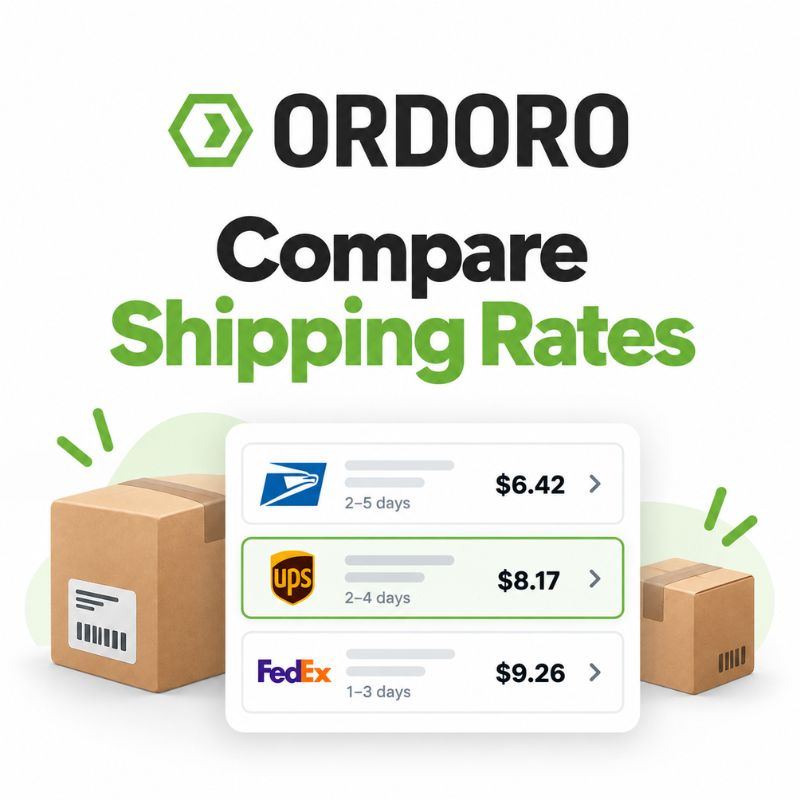
For example, one service may offer the lowest price but take several additional days. Another may cost slightly more while offering an earlier expected delivery.
For an ordinary order, the lower-cost option may be perfectly fine. For a priority customer or time-sensitive shipment, the faster service could make more sense. The important part is being able to see the tradeoff before making the decision.
If you want to get a quick sense of how rates can vary by shipment, you can also use Ordoro’s shipping rate calculator to compare estimated costs based on package and destination details.
Rate Visibility vs. Automated Rate Selection
There are different ways shipping platforms can approach rate shopping. Some workflows emphasize automation, where the system evaluates eligible carrier services and selects an option based on rules such as cheapest, fastest, or best value. Other workflows give the shipper more visibility into the available options before a service is selected.
Ordoro’s Rate Shopping feature lets users see live rates from multiple connected carriers inside the shipping workflow, making it easier to compare cost and delivery timing before choosing a service.
That distinction can be useful when the “best” option depends on something a simple rule may not fully capture.
A slightly more expensive service might arrive meaningfully sooner. A team may prefer one carrier for a particular destination. A subscription customer may receive priority shipping. Or a business may simply want to see the available choices before committing to the label.
Automation can be helpful, but so can visibility.
If you are comparing how different shipping platforms handle these workflows, our Ordoro vs. ShipStation comparison looks at shipping alongside inventory, purchasing, fulfillment, warehouses, kitting, and other eCommerce operations.
Is the Cheapest Shipping Rate Always the Best Choice?
Not necessarily. Shipping cost is important, especially when a business is processing hundreds or thousands of orders. Small differences in label cost can add up quickly. But cost is only one part of the decision.
A business may also need to consider delivery expectations, promised service levels, customer location, package type, and whether an order has been given priority.
Think back to the subscription use case we discussed in our virtual warehouse article. A business may give subscription customers priority fulfillment. In that situation, choosing the lowest-cost option every time may conflict with the service experience the company is trying to provide.
The better shipping option is the one that fits the needs of the particular order, not simply the one with the smallest number next to it.
Shipping Cost vs. Delivery Speed
Cost and delivery speed are often the two pieces of information businesses want to compare first. If one service can deliver a package for $8 in four days while another can deliver it for $9 in two days, the decision depends on what the business values for that shipment.
There may be orders where saving the dollar makes sense. There may be others where getting the package there two days sooner is easily worth the difference. This becomes especially useful when businesses offer different fulfillment priorities, shipping promises, or customer service levels.
Instead of creating one blanket rule for every shipment, rate shopping lets the business see what is available and make the choice with the actual order in front of them.
How Package Weight and Dimensions Affect Shipping Rates
Package details play a major role in carrier pricing. A heavier shipment generally costs more to transport, but physical size also matters. A large lightweight box can sometimes cost more than a smaller, heavier package because carriers have to account for the space the package occupies in their network.
That makes accurate weight and dimensions important when comparing rates. If shipment information is wrong, the rates being compared may not reflect what the carrier ultimately charges.
For eCommerce teams, rate shopping works best when the shipping workflow is connected to accurate package information rather than relying on estimates that may no longer match the order.
Why Ship From Location Matters
The location an order ships from can affect both price and delivery speed. A package traveling a shorter distance may have different carrier options and costs than the same package traveling across the country.
For businesses operating from multiple warehouses or fulfillment locations, the shipping decision can therefore begin before the label is created. Which warehouse has the inventory? Which location should fulfill the order? How far is that location from the customer? What shipping services are available from that origin? This is where rate shopping connects with Warehouse Management for eCommerce and the broader fulfillment workflow.
Inventory location, order routing, and shipping are separate steps, but the decisions made in one can affect the others.
Compare Carrier Rates Without Switching Between Systems
Rate shopping becomes much more useful when available options can be viewed inside the same workflow used to create the shipment. Otherwise, comparing carriers may mean checking one carrier site, then another, then bringing the selected information back into the order system. That creates extra clicks and makes it less likely that teams will compare rates consistently.
With Ordoro, users can compare available carrier rates inside the shipping workflow before creating the label. That keeps the decision close to the order itself, where package details, customer information, Ship From location, and fulfillment context are already available.
The practical benefit is simple: the team can see the available choices, understand the tradeoffs, and make the shipping decision without bouncing between systems.
When Does Shipping Automation Make Sense?
Not every shipment needs someone manually comparing every possible option. For repetitive or predictable shipping workflows, automation can save significant time.
If a business already knows how certain orders should ship, presets and automation rules can help make that process more consistent. A company may have standard package settings, preferred services, or known workflows that apply to a large portion of its orders.
The useful distinction is between automating decisions you already understand and having visibility when the decision still needs judgment. Those two approaches do not have to compete with each other.
A business might automate routine shipments and compare rates manually for exceptions, priority customers, expensive orders, or shipments where speed and cost need to be weighed more carefully.
Rate Shopping Across Multiple Sales Channels
Many eCommerce businesses are not shipping orders from only one storefront. Orders may come from Shopify, Amazon, eBay, BigCommerce, or other channels, but the fulfillment team still has to get every package out the door.
Centralizing those orders can make rate shopping more useful because the same shipping workflow can be applied regardless of where the sale originated. That is where this topic connects to multichannel order management, which we will cover later in this series.
Instead of making carrier decisions separately inside each sales channel, businesses can bring orders together, compare available services, create labels, and return tracking information through a centralized workflow.
How Rate Shopping Fits Into the Fulfillment Workflow
Shipping rate shopping is only one part of getting an order to the customer. Before a team ever compares carriers, the order has already moved through several operational steps. Inventory needs to be available. The correct fulfillment location needs to be selected. Products need to be picked and packed. The package needs accurate weight and dimensions.
Then the shipping decision happens. A typical workflow might look like:
Order received → inventory allocated → fulfillment location selected → items picked and packed → package details confirmed → rates compared → carrier and service selected → label created → tracking sent back
This is why shipping should not be treated as completely separate from inventory and fulfillment. The more connected those workflows are, the easier it becomes to make informed decisions without re-entering the same information in multiple systems.
Our guide to eCommerce Inventory Management covers the inventory side of that process, while this series will continue into order fulfillment, picking and packing, order routing, multichannel order management, and batch shipping.
Common Shipping Rate Shopping Mistakes
Rate shopping is straightforward, but a few habits can make it less useful:
- Comparing only price without considering delivery speed or customer expectations
- Using inaccurate package weights or dimensions
- Ignoring the Ship From location
- Assuming the same carrier will always be the lowest-cost option
- Checking carrier sites separately instead of comparing options within the fulfillment workflow
- Setting automation rules and never reviewing whether they still make sense
The goal is not to spend more time thinking about every label. It is to have enough information to make better decisions while keeping fulfillment moving.
Frequently Asked Questions About Shipping Rate Shopping
What is shipping rate shopping?
Shipping rate shopping is the process of comparing carrier services, prices, and delivery options before buying a shipping label.
How do eCommerce businesses compare shipping rates?
Businesses can use shipping software to retrieve carrier rates based on package details, destination, Ship From location, and connected carrier accounts. The available services can then be compared before a label is purchased.
Is the cheapest shipping rate always the best option?
No. The lowest-cost option may have a longer delivery time or may not meet the service expectations for a particular order. Businesses often need to balance cost with speed and customer expectations.
What affects eCommerce shipping rates?
Shipping rates can be affected by package weight, dimensions, destination, Ship From location, carrier, service level, and other carrier-specific pricing factors.
Can I compare rates from multiple carriers at once?
Yes, if your shipping platform supports multi-carrier rate comparison. Ordoro lets users compare available carrier rates inside the shipping workflow before selecting a service.
Does ShipStation compare shipping rates?
Yes. ShipStation supports rate shopping and automated rate-selection workflows. The difference is less about whether comparison exists at all and more about how each platform presents and uses rate information within the shipping workflow.
For a broader feature comparison, see Ordoro vs. ShipStation.
Does the warehouse an order ships from affect the rate?
Yes. The physical Ship From location is one of the factors used in calculating shipping options, so changing the fulfillment origin can affect cost, service availability, and delivery timing.
Should every shipping decision be automated?
Not necessarily. Automation works well for predictable workflows, while manual comparison can be useful when cost, delivery speed, customer priority, or other factors vary from order to order.
See Your Options Before You Ship
Shipping decisions become easier when the information behind them is visible. The cheapest rate may be the right choice for one order. A faster service may make more sense for another. A different Ship From location could change the options again.
Rate shopping gives eCommerce teams a way to compare those tradeoffs before committing to a label. And as shipping volume grows, connecting that decision to the rest of the fulfillment process becomes increasingly useful.
Ordoro brings orders, carriers, warehouse locations, shipping workflows, and rate comparison together so teams can see their options and keep orders moving.
Ready to compare rates before you ship? Explore Ordoro Shipping or start a free trial.